
Messenger
Meta Platforms, Inc.Communication
4.72.45M Reviews
- Version
- 584.1.0.61.98
- Installs
- 5.00B
- Age Rating
- Everyone
Screenshots
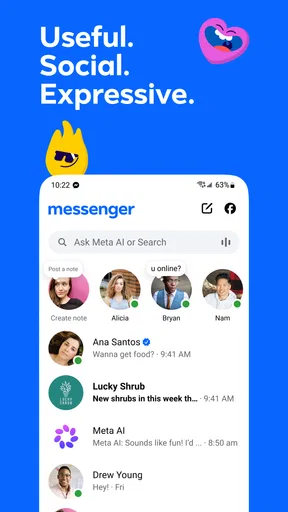



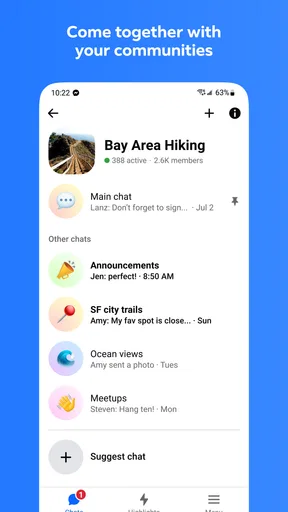



Our Review of Messenger
 Analysis by Appyee
I think Messenger is easiest to judge by the small moments when communication gets inconvenient: a friend is hard to reach by phone, a group is trying to settle a plan, or a quick call would be clearer than a string of texts. Those are the situations where I find it useful. It is a communication app from Meta Platforms, Inc., and its familiar Facebook connection can make it a natural choice if the people I want to contact already use that network.
Where setup and everyday use can snag
The first point of friction is choosing how to sign in and who you expect to reach. Messenger’s close relationship with Facebook is a benefit for people who already have an account and contacts there, but it can feel like an unnecessary extra step if you simply want a separate messaging tool. Before installing, I’d think about whether my family, friends, or group already use it. An app is only convenient when the other people are reachable on it.
Once I’m in, I try not to assume that every missing conversation means something is broken. A person may be using another account, or the group may have moved to a different service. I start by checking the name and conversation context, then ask the person through a channel we already share if I’m unsure. That simple check avoids wasting time changing settings when the issue is really just that we are looking in different places.
Messenger is free to install and is rated for Everyone, which makes it accessible for a broad range of users. It has a 4.7 average from around 112 million ratings, and it has passed five billion installs. Those figures suggest a very large audience, but they don’t guarantee that every friend or relative will be active there. I’d use my own contact circle, rather than popularity alone, to decide whether it belongs on my phone.
Checks that make the first session smoother
For a less frustrating start, I’d sign in carefully, confirm that I’m using the account my contacts know, and send a simple test message to someone who can reply. If a call is the main reason I installed it, I’d test a short call before relying on it for an important conversation. That gives me a chance to spot a device or connection problem while there is still time to switch to an ordinary phone call.
Notifications are another place where expectations matter. If I miss a message, I check whether Messenger’s notifications are allowed in the phone’s settings and whether the conversation itself is muted. I also consider whether the phone is in a focus or quiet mode. These are practical checks rather than proof that the app has failed; a message can arrive normally while an alert is held back by the device.
I’d also keep the app current when a problem appears to be persistent. The current version is 563.0.0.47.86, and updates can change how an app behaves or fix issues, so checking the store is a sensible early step. If I’m troubleshooting, I make one change at a time and test again. Changing several settings at once makes it harder to tell which step helped.
Recovering a conversation without making things worse
When a message seems stuck, I first check the internet connection by opening another app or page. If other services are also struggling, switching between Wi-Fi and mobile data, when available, can help identify whether the connection is the bottleneck. I avoid repeatedly tapping send, especially for a time-sensitive note, because duplicate messages can create confusion once the connection catches up.
If the app feels slow, I close and reopen it, then give it a moment to load before retrying the same action. For a call that will not connect, I check the connection on both ends if possible and ask the other person to try calling me. That makes it easier to distinguish a one-sided setup issue from a temporary network problem. When the conversation is urgent, I switch to another agreed channel instead of treating Messenger as the only route.
There is also a useful distinction between convenience and confidentiality. The original article’s mention of “Secret Conversations” reflects one privacy option, but I would not assume every chat has identical protections or settings. If sensitive information is involved, I check the conversation’s current privacy details before sending it. For especially private discussions, a service whose security model is clear and suited to that need may be the better choice.
Making Messenger fit the way you communicate
A practical everyday example: I’m coordinating a weekend visit with several relatives. I can put the discussion in one group instead of relaying the same time and address to each person separately, then use a voice or video call if a detail is easier to explain aloud. Naming a group and giving it a recognizable theme can also make it easier to spot among other chats. The trade-off is that group conversations can get noisy, so I keep the actual plan clear and avoid assuming everyone has seen every message.
Useful habits for groups, calls, and busy days
For planning, I find it helps to send one concise message with the decision or next step after a lively discussion. That gives people something easy to find later, rather than asking everyone to scroll through a long exchange. If the group is only temporary, I also think about whether I really need to keep using it after the event. This is less about a hidden feature than a small habit that keeps Messenger from turning into an endless stream of old coordination chats.
Calls are most useful when typing would slow everyone down: explaining directions, checking in with a relative, or resolving a misunderstanding that is becoming harder to read in text. I would still test the connection ahead of an important call and keep a backup option in mind. A video call depends on both people having a workable connection and a comfortable moment to answer, so it is not automatically better than a short voice call or a text.
The app also has a broad social style, with stickers and GIFs that can make casual conversations feel warmer. I like that when the group shares the same sense of humor, but expressive replies can be distracting in a practical conversation. For a time, place, or other detail people need to act on, I use plain wording first and treat reactions or playful images as decoration rather than the message itself.
Where it sits among messaging alternatives
Compared with a basic SMS conversation, Messenger can bring text, internet-based voice and video calls, and more expressive group exchanges together in one app. That is appealing when the people I contact already use it and have a reliable internet connection. SMS or a regular phone call can be more straightforward when I need to reach someone without asking them to adopt the same app, or when mobile data access is unreliable.
Other messaging apps may be a better fit when a whole family, workplace, or friend group has already settled on one. Switching everyone just for a single feature creates friction, and using too many chat services makes it easier to overlook a message. I choose based on who needs to be included and what the conversation requires, not on a claim that one service is best for everyone. Messenger’s strongest case is convenience within a network of people who are already there.
It is less suitable for someone who wants a messaging app with no Facebook connection, or who prefers to keep social communication in a smaller, more focused tool. It may also be the wrong choice if a user’s priority is a particular privacy approach and they have not checked how the relevant conversation is protected. I would not install it simply because it is popular; I would install it when its contact network and mix of messaging and calling solve a real problem for me.
Cost, limits, and a practical verdict
There is no upfront charge to download Messenger, though the app includes in-app purchases, with listed items ranging from five cents to just under seven hundred forty dollars. I wouldn’t treat those purchases as necessary for basic communication, and I’d review any purchase screen carefully before confirming anything. The app’s scale is impressive, but a large install count does not make every optional purchase relevant to an ordinary chat.
My main reservations are the possibility of battery drain, the attention a busy group can demand, and the need to be deliberate about privacy settings. Those aren’t reasons to avoid it outright; they are reasons to use it with sensible expectations. If battery life matters on a long day, I keep an eye on usage and save nonessential calls for when I can charge. If a group is overwhelming, I mute it where appropriate or agree on a clearer channel for urgent details.
Messenger is a strong everyday option for people whose contacts are already there and who want more than plain text without juggling separate apps for every conversation. Meta Platforms, Inc. has built a familiar communication tool with a 4.7 average and a reach of over five billion installs, but my recommendation is still conditional: choose it for the people and routines it helps you connect, not for its popularity alone.
If you're like me, always on the lookout for a way to stay in touch with friends and family, you’ve probably come across Messenger. It’s one of those apps that seems to have found a permanent spot on my phone’s home screen. Let me share why this app is a staple for so many of us.
What Makes Messenger Stand Out?
Messenger isn’t just your average messaging app; it’s packed with features that make communication super easy and fun. From text messages to voice and video calls, you’ve got everything covered in one place. And let's not forget the quirky stickers and gifs that add a bit of personality to our chats.
One of the first things you'll notice is how seamlessly Messenger integrates with Facebook. If you’re a Facebook user, this is like a magic wand that brings all your contacts together without you having to lift a finger. You don’t even need a phone number, just your Facebook credentials, and you’re good to go!
Features That Keep You Hooked
The app really shines with its voice and video calling features. I find myself using these more often than I thought I would. The quality is pretty impressive, and it’s a lifesaver when I’m trying to connect with friends overseas without racking up a hefty phone bill.
Then there’s the group chat feature. Whether you’re planning a trip or just catching up with a bunch of friends, creating a group is a breeze. You can even name your group chats and customize them with fun themes and emojis.
"The app really shines with its voice and video calling features."
Plus, the app’s ability to send and receive money is a game-changer. I’ve used it a couple of times to split bills or send a quick birthday gift, and it’s just so convenient. No more awkward bank transfers!
Things to Keep in Mind
Of course, no app is perfect. One thing I’ve noticed is that Messenger can be a bit of a battery drainer. It’s not a huge deal if you’re near a charger, but it’s something to be aware of if you’re out and about.
Privacy is another consideration. Messenger does offer end-to-end encryption for its “Secret Conversations” feature, but it’s not the default setting. So, if you’re chatting about something sensitive, you might want to enable that option.
Final Thoughts
Overall, Messenger is a robust app that offers a lot more than just chatting. It’s like a Swiss army knife for communication, packed with tools that make staying connected easier than ever. Whether you’re hopping on a quick call or sending a fun gif, it’s got you covered.
If you haven’t tried it yet, I’d say give it a shot. It’s available for both Android and iOS, and you can download it directly from the app store. Happy chatting!
Privacy and Permissions
See what permissions an app requests and how it handles your data.
- Identity
- find accounts on the device, add or remove accounts, read your own contact card
- Calendar
- read calendar events plus confidential information, add or modify calendar events and send email to guests without owners' knowledge
- Contacts
- find accounts on the device, read your contacts, modify your contacts
- Location
- approximate location (network-based), precise location (GPS and network-based)
- Phone
- directly call phone numbers, read phone status and identity
- Photos/Media/Files
- read the contents of your USB storage, modify or delete the contents of your USB storage
- Storage
- read the contents of your USB storage, modify or delete the contents of your USB storage
- Camera
- take pictures and videos
- Microphone
- record audio
- Wi-Fi connection information
- view Wi-Fi connections
- Device ID & call information
- read phone status and identity
- Other
- view network connections, create accounts and set passwords, pair with Bluetooth devices, access Bluetooth settings, change network connectivity, connect and disconnect from Wi-Fi, full network access, change your audio settings, control Near Field Communication, read sync settings, run at startup, draw over other apps, control vibration, prevent device from sleeping, toggle sync on and off, install shortcuts, read Google service configuration
How Messenger Compares
Full ComparisonChoose Meet for larger video meetings, WhatsApp for private everyday messaging, and Messenger for Facebook-connected chats and expressive calls.
| App | Developer | Rating | Price |
|---|---|---|---|
 Google Meet | Google LLC | 4.4 | Free |
 WhatsApp Messenger | WhatsApp LLC | 4.6 | Free |
 MessengerThis App | Meta Platforms, Inc. | 4.7 | Free |
Verdict
Strengths of Messenger
- User-friendly interface for easy navigation.
- Seamless integration with Facebook contacts.
- Supports video and voice calls.
- Wide range of fun stickers and emojis.
- Cross-platform compatibility.
Limitations of Messenger
- Consumes significant battery power.
- Occasional notification delays.
- Requires Facebook account to sign up.
- Can be data-intensive with heavy use.
- Privacy concerns with message storage.
Other Releases by Meta Platforms, Inc.
View All


Similar Picks in This Category
View All
Google Messages
Google LLC4.6

Gmail
Google LLC4.1

Google Meet
Google LLC4.4

Google Chrome
Google LLC4.1

WhatsApp Messenger
WhatsApp LLC4.6

Carrier Services
Google LLC4.2
You May Also Like
View All


Frequently Asked Questions
What features does Messenger offer?
Messenger provides a variety of features such as text messaging, voice and video calls, group chats, and the ability to send photos, videos, and files. It also includes fun elements like stickers and emojis, as well as more practical tools like location sharing and integration with Facebook for seamless connectivity.
Is Messenger free to use?
Yes, Messenger is free to download and use. It does, however, require an internet connection, so data charges may apply if you're using it over a mobile network. The app itself does not charge for messaging or calling, making it a cost-effective communication tool.
Can I use Messenger without a Facebook account?
While Messenger was originally linked to Facebook accounts, you can now use it without a Facebook account by signing up with your phone number. This allows you to access most features, though some functionalities may still require Facebook integration.
How secure is Messenger?
Messenger provides several security features to protect your conversations. It uses encryption for messages in transit and offers optional end-to-end encryption through Secret Conversations. However, it’s important to note that not all conversations are end-to-end encrypted by default, so users should enable this feature for added privacy.
What are the system requirements for Messenger?
Messenger is available for both Android and iOS devices. For Android, it requires version 5.0 and up, while for iOS, it requires version 12.0 or later. Make sure your device meets these requirements to ensure optimal performance and access to all features.
